
Recently, I needed a way to take a list of name and concatenate them with a separator between them. There are many ways to this in C#, but I was feeling lazy so I wanted to see if there was a simpler way… in SQL. To set the stage, I needed to be able to take a table with the name of the object in rows. So let’s say we have two tables Group and Group Members:
CREATE TABLE [dbo].[Group]
(
    [Id] [BIGINT] IDENTITY(1,1) NOT NULL,
    [Name] VARCHAR(255) NULL
)

CREATE TABLE [dbo].[GroupMembers]
(
    [Id] [BIGINT] IDENTITY(1,1) NOT NULL,
    [GroupId] BIGINT NOT NULL ,
    [UserEmail] VARCHAR(255) NOT NULL
)
Let’s create a group and some new members:
INSERT INTO [Group] (Name) SELECT 'My Group'

INSERT INTO [GroupMembers] ([GroupId], [UserEmail]) SELECT 1, 'test@test.com'
INSERT INTO [GroupMembers] ([GroupId], [UserEmail]) SELECT 1, 'test1@test.com'
INSERT INTO [GroupMembers] ([GroupId], [UserEmail]) SELECT 1, 'test2@test.com'
INSERT INTO [GroupMembers] ([GroupId], [UserEmail]) SELECT 1, 'test3@test.com'
The goal is to take a group and the first five users and return the name of the group and a concatenation of the emails. To start with, we can just pull the data directly, but it gives us all rows as opposed to just one:
SELECT
    g.[Name],
    gm.[UserEmail]
FROM
    [GROUP] g
    INNER JOIN [GroupMembers] gm ON gm.[GroupId] = g.[Id]
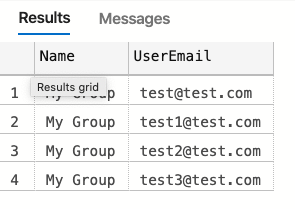
Reminder the goal is to have a single row with the emails concatenated and we want to do this in SQL, so this isn’t helpful. If I did choose to do this in code, I would have to iterate over the collection, insert the separator and combine the strings. I would also need to track if I was on the last item so that I didn’t add a trailing separator. Enter STRING_AGG. In their words:
Concatenates the values of string expressions and places separator values between them. The separator is not added at the end of string.
This is perfect, so let’s try it out. From the docs, we can see that we have two parameters: expression and separator.

This takes our previous query and with a few adjustments we get this:
SELECT
    g.[Name],
    [Emails] = STRING_AGG(gm.[UserEmail], ', ')
FROM
    [GROUP] g
    INNER JOIN [GroupMembers] gm ON gm.[GroupId] = g.[Id]
GROUP BY
     g.[Name]
When we run this, we get the exact results that we are looking for.

There are a couple of things to note. I added a space after the separator to make it look better and for it to work we have to apply the group by. The only thing that is left is to set the order of the aggregate strings. I mention this because it got logged as a bug. I should have known better, rookie mistake. Oh well. It is really simple, we just need to add the WITHIN statement at the end of the STRING_AGG function:
SELECT
    g.[Name],
    [Emails] = STRING_AGG(gm.[UserEmail], ', ') WITHIN GROUP ( ORDER BY gm.[UserEmail] DESC)
FROM
    [GROUP] g
    INNER JOIN [GroupMembers] gm ON gm.[GroupId] = g.[Id]
GROUP BY
     g.[Name]
Its really that simple. Good luck!
 It's just me