If you have been following along, you know that I am trying to become a data scientist. That means that I am reading more books that are probably healthy for a person to binge read. I wanted to highlight some of the books that I have been reading and some comments. I am going to list them in the order that I read them and I will close with the order that I should have read them in.
This really was an excellent book to start with. It game me a good overview of what the field looks like and how to use the tools – Python. Not knowing Python did give me some challenges, but I was able to work around this with Google. Like most of the other books that I read it starts with some foundation in math, which was good because I have been out of school for more than a decade. Overall I think this was a good place to start.
After reading about Neural Networks and Deep Learning, I was hooked. I google for a book and this one popped up. I had heard of TensorFlow before, but I didn’t know about Keras. Keras is a helper library which makes things very easy. This book was written by the creator of Keras. This one is awesome and in depth. I learned a lot from it, but there was some fundamental things that were still a bit confusing even with my superior google sleuthing abilities. I am still reading that last few chapters because I felt I needed to take a break. Honestly my brain was full, but I am a glutten for punishment, so I moved to the next book.
This one was not for the faint of heart. I read through the first few chapters, but just like the last book it only made my brain hurt more. It is really a textbook in disguise, but it is really good. I plan on getting back to it soon because some of the things that are missing for me are the more advanced math.
This was the best book yet. Neural Networks are really simple in concept, but I was still having a hard time seeing that. Seth takes a great approach to teaching each concept. He breaks them down using the math, code and a diagram. This approach really worked for me. The biggest part that really drove things home was writing a the neural network from scratch. Learning to Use Keras was good, but without the deeper understanding it was all a little too much voodoo for me. I give this one 5 stars. After reading Joel Grus book, I should have read this one second.
I think this is the book that I should have read second. It is so comprehensive in the breadth of topics, I love it. This one is also a textbook in disguise. I don’t have much to say other than stop reading my post and go buy it already.
As I was going through the chapter on convnets in Chollet’s book, Deep Learning with Python, one of the things that I found interesting was the ability to extend an existing trained model. When you think about image recognition, I can’t imagine being able to collect enough images to be able to build a decent model. I thought about an application that could track soccer players on the field and detect how often they were engaged with the ball. Engagement would be defined as the amount of time they were spotted within 1 to 2 meters of the ball.
I think this would be an interesting project, but collecting images of all of the angles that players might find themselves in would be a challenge if not impossible. I wonder how many images of each player would it take to train the model. One of the things that might work is using data augmentation or more specifically taking the same images and mutate them into new images. The mutation could be a translation or an offset in the frame to make the image different, at least to the machine. These images would add to the existing pool and improve the model since there is now more training data. Keras takes care of those mutations with their ImageDataGenerator class.
Convolution using a windowed view of the image and moves that image around to find local features. In contrast, Dense layers look at the whole of the features to train. I am an not an artist so I won’t try to show an example of a convolution window, but think of reading the news paper through a magnifying glass and moving it around until eventually you have covered the whole page.
Chollet gives an explanation of strides and padding, which seem straightforward. I think the best explanation from another well known site MachineLearningMastery. The purpose of the padding is really to give each pixel the change the be in the center of the window. Since the window move 1 pixel at a time from left to right, unless the size of this image is large enough, it is impossible to center the border pixels. For a 5 X 5 image and a 3 X 3 window, it will be impossible to center each pixel, but it you add that image such that it is a 7 X 7 dimensioned image, you can center the pixels.
I am going to post the code from the book since it is more concise, but you can get the true source from Chollet’s GitHub. This code assumes that you have downloaded the cats vs dogs dataset from Kaggle and you have loaded the data and separated them out. I have posted my version on GitHub, but again it is derived from the authors code.
#We need to setup the environment and some paths to our images:
import os
import shutil
from keras import layers
from keras import models
from keras import optimizers
from keras.preprocessing.image import ImageDataGenerator
os.environ['KMP_DUPLICATE_LIB_OK']='True'

base_dir = '/Users/heathivie/Downloads/cats_and_dogs_small'
train_dir = os.path.join(base_dir, 'train')
validation_dir = os.path.join(base_dir, 'validation')
test_dir = os.path.join(base_dir, 'test')
I needed to add this piece os.environ[‘KMP_DUPLICATE_LIB_OK’]=’True’ because it was failing with this error:
OMP: Error #15: Initializing libiomp5.dylib, but found libiomp5.dylib already initialized.
OMP: Hint: This means that multiple copies of the OpenMP runtime have been linked into the program. That is dangerous, since it can degrade performance or cause incorrect results. The best thing to do is to ensure that only a single OpenMP runtime is linked into the process, e.g. by avoiding static linking of the OpenMP runtime in any library. As an unsafe, unsupported, undocumented workaround you can set the environment variable KMP_DUPLICATE_LIB_OK=TRUE to allow the program to continue to execute, but that may cause crashes or silently produce incorrect results. For more information, please see http://www.intel.com/software/products/support/
There are a ton of images that need to be processed and used for training, so we will need to use Keras’ ImageDataGenerator. It is a python generator that looks through the files and yields the image as it is available. Here we will load the data for training.
The first train_datagen is filled with parameters to support the data augmentation. The next to pieces there simple setup the path, target (image size) and batch size. It also specifies what the class model is and since we are doing a classification of two types (cats & dogs) we will use binary.
Like the earlier posts we will still be using a Sequential model, but we will start with the ConvD layers.
Above we have specified that we want to have a 3 X 3 window, 32 filters (channels), relu as our activation and the image shape of 150 X 150 X 3. One thing to note, we need to do a classification which requires a Dense layer to process, so how do we translate a 3D tensor to fit the dense layer. Keras gives a Flatten method to do this. It final shape is a 1D tensor (X * Y * Channel).
We finalize it with a single Dense layer with the sigmoid activation. The last piece is to compile the model. For this we will use the loss function binary_crossentropy since this is a classification problem with 2 possible outcomes.We will again use the optimizer RMS prop, but here we will specify a learning rate or the rate at which it moves when doing the gradient. Lastly, we configure it to return the accuracy metrics.
Now we can run the fit method, supplying it with the training and validation generators that we created above. The step* parameters are there to make sure that our generators don’t run forever. This is configured to run 30 epochs at 100 steps each, so on my machine this takes about 10 minutes. Make sure you save your model.
history = model.fit(
    train_generator,
    steps_per_epoch=100,
    epochs=30,
    validation_data=validation_generator,
    validation_steps=50)

model.save('ch_5_cat_dogs.h5')
After running through all of the epoch’s, I achieved a 0.75 accuracy. This is what it looked like:
After you have saved your model, you can go a take picture of your cat or dog (or grab one of the internet) and use it to predict whether it is a cat or a dog.
import os
import numpy
from keras.models import load_model
from keras.preprocessing import image
base_dir = '/Users/heathivie/Downloads/cats_and_dogs_small'
# load model
model = load_model('ch_5_cat_dogs.h5')
# summarize model.
model.summary()
file = test_dir = os.path.join(base_dir, 'test/cats/download.jpeg')
f = image.load_img(file, target_size=(150, 150, 3))
x = image.img_to_array(f)
# the first param is the batch size

y = x.reshape((1, 150, 150, 3)).astype('float32')

classes = model.predict_classes(y)
print(classes)
I used this image of my amazing dog Fergus and the prediction was correct, he was indeed a dog.
The next post I will do is use a pre-training convnet, which I think it awesome. I am going to continue talking about the goal of a model that can detect someone and their proximity to a ball.
Yesterday I posted an example of the Pima dataset which provide data on the features of an individual and their likelihood to be diabetic. I didn’t get great results (only 67%), so I wanted to take another look and see if there was anything that I could change to make it better. The dataset is pretty small, only 768 records. In my readings, it showed that when you have a small population of data you can use K-Fold Cross Validation to improve the performance of the model.
K-Fold splits the data into k folds or groups. For instance if you set k to be 3, the data will be split into 1 validation set and 2 training sets. For each k the 2 training sets will be used for… fitting the model and the remaining will be used for validation. SciKitLearn has a KFold objects that you can use to parcel the data into the sets. An interesting point that I didn’t catch at first is that the split function returns sets of indices, not a new list of data.
for train_index, test_index in kf.split(x_data,y_data):
So now that we have our data split into groups, we need to loop over those groups to train the model. Remembering that the split data is just an array of indices, we need to populate our training and test data.
Now to capture the metrics of each fold, we need to store them in an array and I set aside the model with the best performance.
    current = results[1]
    m = 0
    if(len(accuracy_per_fold) > 0):
        m = max(accuracy_per_fold)

    if current > m :
        best_model = model
        chosen_model = pass_index

    loss_per_fold.append(results[0])
    accuracy_per_fold.append(results[1])
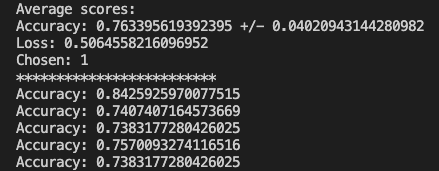
Putting it all together after all folds have been processed, we can print the results.
Now we can run our test data through the model and check out the results.
y_new = best_model.predict_classes(x_test)
total = len(y_new)
correct = 0
for i in range(len(accuracy_per_fold)):
    print(f'Accuracy: {accuracy_per_fold[i]}')

for i in range(len(x_test)):
    if y_test[i] == y_new[i]:
        correct +=1

print(correct / total)
Everything worked and based on the randomized test data I was able to achieve a 75% accuracy where the previous method yielded 67%. The full code can be found on GitHub. Just like the other posts, these are just my learnings from the book Deep Learning with Python from Francois Chollet. If any expert reads through this and there is something that I missed or was found to be incorrect, please drop a comment. I am learning so any correction would be appreciated.


 It's just me