Recently while reworking our app to add multi-language support I came across the need to use the intl api outside of the component structures. I tried a couple of different paths, such as a singleton-like provider that is populated by a wrapper component when it is mounted. This worked fine, but was really ugly.
For my use case I have the need to load the language file (data) from the server at runtime, so we needed a way to dynamically load the intl provider after the fact. I didn’t find a way to do that, so we will have to make sure that the data is available when the components at the root are mounted (not a big deal). What I did find, however, was in their api I can create a new instance of the intl object outside of the provider.
There are some considerations with having two instances of the intl object floating around like memory usage, but for our user load that isn’t really an issue for us. To build this out we need to supply a two character locale string, so for that I am using the package locale2. I don’t think anyone could have made that package any easier to use. Like I mentioned, I needed to load the language data from the server when the page is rendered. To extract the language data, I use simple function to pull it from the window object. Now that I have all that I need, I can create the new intl object and return that as an export.
For the second time in a year I need a package to create an ICalendar (*.ics) file in my projects. I tried a couple different packages, but they either didn’t work well or they did not have what I needed requiring me to modify it. I decided that I needed to just build one from the standard. I also have never published a package to the npm registry, so I figured it was time to do both. You can checkout the Github here.
For my immediate needs I required the ability to create an event or a collection of events. These come in the form of a VCalendar and a VEvent. I started googling to find the references for the standards. I came across ICalendar.org which seemed to have most of what I was looking for, but I found it hard to digest in the HTML format, so I decided to go straight to the RFC linked above.
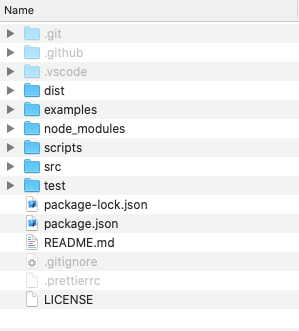
I Started with a simple folder structure. The names are self-describing.
I wanted to follow a builder pattern and have the creation be fluid. This means that the builder is returned in each call so that you can chain the method calls. I like the way it looks and I think it is easier to read.
I wanted to make sure that I didn’t have to polyfill so I used the current version of js which is while you will see classes instead of functional objects. Both of the CalendarBuilder and the EventBuilder are almost the same, they have a constructor, build method, validation method and then the setter methods. Here is an example of the CalendarBuilder.
In the standard there are some supporting objects like an Attendee and Organizer so I have objects for those. Currently I am using the uuid package to generate the required uid field. I may look for another implementation because it is pretty large, but it is ok for now.
In the end, it is pretty simple to execute to get the ics text that you can use in a file or send to a download (if hosted on the web).
const {
    CalendarBuilder,
    EventBuilder,
    Attendee,
    Organizer,
    Role,
    CalendarUserType,
    RSVPType
} = require('ics-standard-compliant-file-generator')

/*

    To import the package you will need to either run this example outside of the root
    or modify temporarily the package.json to change the name.  Otherwise, the package
    will not install because there will be a name conflict

*/

/*

    Start with creating a Calendar Builder, this does not need to happen at first but it is logical to start here
    The Calendar Builder is the container and the actual generator of the *.ics file

*/
var c = new CalendarBuilder()
c.setUrl('http://www.mycalendar.com')
c.setSource('http://www.mycalendar.com/test.ics')
c.setColor('red')
c.addCategory('Meeting')
c.addCategories('my meeting, you meeting')
c.setName('HOME')

/*

    Now lets build a single event by instantiating an Event Builder
    We can create the bare minimum required for an event

*/
var eb = new EventBuilder()
eb.addOrganizer(new Organizer('testOrganizer@gmail.com', 'Test Organizer'))
    .addAttendee(
        new Attendee(
            'testAttendee@gmail.com',
            'Test Attendee',
            null,
            'test-delegate-from@test.com',
            'test-delegate-to@test.com',
            null,
            'test-sent-by@test.com',
            Role.CHAIR,
            CalendarUserType.INDIVIDUAL,
            RSVPType.TRUE
        )
    )
    .setStart(new Date(2021, 0, 1, 20, 00))
    .setEnd(new Date(2021, 0, 2, 20, 00))
    .setSummary('Party Time')
    .setDescription("We're having a pool party")

//Now that we have described our event, we can add it to the Calendar Builder
c.addEventBuilder(eb)

//All that is left is to call the build the file contents
let icsContent = c.build()

//At this point you use which ever method you want to use to create the file
//For testing I just pushed the console output to a file
console.log(icsContent)

//The call from the terminal then becomes:
// node index.js > test.ics
After running this, you will get an output similar to this:
I am still working on this, because I want to add more validation and add the other calendar objects that are compatible such as the VTodo and VJournal.



 It's just me