I Jest, but still I test

I am working on a project that allows customers to purchase credits to be applied towards so circles (buckets) for use to perform certain actions. The code is pretty simple, but there are bugs and I think it is the right time to refactor. The app is a SPA written in React, so it is all JavaScript and the tests are in Jest. It’s also a multi-lingual so we are pulling in the react-intl library which is a great library. Here it is what we are starting with:

useEffect(
        () => {
            let totalAllocated = plan.totalCaseCreditsAllocatedInCircle ? plan.totalCaseCreditsAllocatedInCircle : 0
            let totalUnallocated = plan.totalCaseCreditsUnallocated ? plan.totalCaseCreditsUnallocated : 0
            if (casesInputValue !== totalAllocated) {
                if (casesInputValue < totalAllocated) {
                    let x = totalAllocated - casesInputValue
                    if (x < 0) x = 0
                    setExplanationText(
                        intl
                            .formatMessage({ id: 'app.circle.manageAllocations.casesTooltipRemoving' })
                            .replace('%N%', x)
                    )
                    setOneTimeCasePrice(0)
                } else if (casesInputValue >= totalUnallocated) {
                    //if they are asking for more than is available
                    let overage = 0
                    overage = casesInputValue - (totalUnallocated + totalAllocated)
                    if (overage > 0) {
                        setExplanationText(
                            intl
                                .formatMessage({ id: 'app.circle.manageAllocations.casesTooltipAdding' })
                                .replace('%N%', overage)
                        )
                        setOverage(overage)
                        setOneTimeCasePrice(overage * casePrice)
                    } else {
                        setExplanationText()
                        setOneTimeCasePrice(0)
                    }
                } else {
                    setExplanationText()
                    setOneTimeCasePrice(0)
                }
            } else {
                setExplanationText()
                setOneTimeCasePrice(0)
            }
        },
        [ casesInputValue ]
    )

The scenario is that the user is trying to apply credits to a group (not interesting, just a term). If they do not have enough credits they will be charged for the overage. So you can see from the spaghetti above that there are lots of work to do (maybe not a lot). There are five use cases that need to be implemented:

  1. User is making no changes
  2. User has zero credits and is trying to add more
  3. User has credits and is applying less than the total that they have paid for
  4. User has is applying credits, some of which they have in the bank and then an overage that must be charged
  5. User has specified less than what is currently allocated, then the difference will be removed and made available for reallocation

Now that we know what we were supposed to be doing we can add some tests to prove that our refactoring was correct. Like I mentioned, for the testing I will be using Jest. To get started with Jest, there are two scenarios in a React app. If you have built your react app using create-react-app then jest is already configured for you. If you have built from scratch or you have ejected your app you will need to hop over to their website and follow the instructions. Our app uses create-react-app so things start a little easier.

Since we used the builder and it is already configured we can just run npm run test. It will scour our workspace for files that use a naming convention, I use class.test.js. Now I am using VS Code for Mac, so for convenience I configured the launcher to run the test automatically. To get it running the way I wanted I needed to add a json file: launch.json. Here is the configuration that I used:

{
    "version": "0.2.0",
    "configurations": [
        {
            "type": "node",
            "name": "vscode-jest-tests",
            "request": "launch",
            "runtimeExecutable": "${workspaceFolder}/node_modules/.bin/react-scripts",
            "args": [
                "test",
                "--env=jsdom",
                "--runInBand"
            ],
            "cwd": "${workspaceFolder}",
            "console": "integratedTerminal",
            "protocol": "inspector",
            "internalConsoleOptions": "neverOpen",
            "disableOptimisticBPs": true
        }
    ]
}

Now from the debugger view, I can use it’s run buttons to debug my tests. So for the first test case: User is making no changes I start with an empty method that does nothing more than returns an empty result:

export const onManagePlanCaseRequestChanged = (input, plan, intl, price) => {
	let result = {
		additions: 0,
		newNonFreeAdditions: 0,
		price: 0,
		explanationText: null
	}
	if (plan && plan.totalCaseCreditsAllocatedInCircle !== input) {
	}
	return result
}

Pretty straightforward, so lets add a test:

test('input and plan are equal', () => {
	expect(onManagePlanCaseRequestChanged(1, 1, intl, price)).toEqual({
		additions: 0,
		newNonFreeAdditions: 0,
		price: 0,
		explanationText: null
	})
})

If we break this down setting a name for our test 'input and plan are equal' then the callback that will be passed to execute the test expect(onManagePlanCaseRequestChanged(1, 1, intl, price)). All thats left is to specify what will be the result. In this case, I am returning an object so we can use toEqual to validate the result. When we run the test we get a print out with the results:

Test Suites: 1 skipped, 0 of 1 total
Tests: 1 skipped, 1 total
Snapshots: 0 total
Time: 3.464s, estimated 4s

One down, let’s attack use case 2: User has zero credits and is trying to add more. Lets add the new logic inside the if state for the case when they are adding:

if (plan && plan.totalCaseCreditsAllocatedInCircle !== input) {
	if (input > plan.totalCaseCreditsAllocatedInCircle) {
		//adding cases

		result.additions = input - plan.totalCaseCreditsAllocatedInCircle
		result.explanationText = intl
			.formatMessage({ id: 'app.circle.manageAllocations.casesTooltipAdding' })
			.replace('%N%', result.additions)
	}
}

Now that we are starting to check if they are asking to add more to the bucket, so we will pass in a request for more items over what is already in there.

test('input is greater than allocation, but less that total unallocated.  returns overage and message  ', () => {
	let plan = {
		totalCaseCreditsAllocatedInCircle: 10,
		totalCaseCreditsUnallocated: 10
	}

	const formatMessage = jest.fn((x) => 'Adding %N% Case Credits to this Circle')
	let intl = {
		formatMessage: formatMessage
	}

	expect(onManagePlanCaseRequestChanged(11, plan, intl, price)).toEqual({
		additions: 1,
		newNonFreeAdditions: 0,
		price: 0,
		explanationText: 'Adding 1 Case Credits to this Circle'
	})
})

This become interesting because now I have a dependency it required Intl. This object has a single method that we will need to mock formatMessage. Jest provide a simple utility to mock it out. We need to specify using a fat arrow a response to a callback:

const formatMessage = jest.fn((x) => 'Adding %N% Case Credits to this Circle')
//Assign it to the intl object
let intl =
{
    formatMessage: formatMessage
}

Now whenever the formatMessage is called on the intl object, the message above will be returned. We can run this test and see that it passes also:

Test Suites: 1 passed, 1 total
Tests: 3 skipped, 1 passed, 4 total
Snapshots: 0 total
Time: 3.464s, estimated 4s

Jumping ahead here is the final code

export const onManagePlanCaseRequestChanged = (input, plan, intl, price) => {
	let result = {
		additions: 0,
		newNonFreeAdditions: 0,
		price: 0,
		explanationText: null
	}

	if (plan && plan.totalCaseCreditsAllocatedInCircle !== input) {
		if (input > plan.totalCaseCreditsAllocatedInCircle) {
			//adding cases

			result.additions = input - plan.totalCaseCreditsAllocatedInCircle
			result.explanationText = intl
				.formatMessage({ id: 'app.circle.manageAllocations.casesTooltipAdding' })
				.replace('%N%', result.additions)

			if (result.additions > plan.totalCaseCreditsUnallocated) {
				result.newNonFreeAdditions = result.additions - plan.totalCaseCreditsUnallocated
				result.price = result.newNonFreeAdditions * price
			}
		} else if (input < plan.totalCaseCreditsAllocatedInCircle) {
			//removing cases
			result.explanationText = intl
				.formatMessage({ id: 'app.circle.manageAllocations.casesTooltipAdding' })
				.replace('%N%', plan.totalCaseCreditsAllocatedInCircle - input)
		}
	}
	return result
}

Happily, all cases are covered and the tests now pass:

Test Suites: 1 passed, 1 total
Tests: 4 passed, 4 total
Snapshots: 0 total
Time: 3.431s, estimated 8s
Ran all test suites.

Issues:

I had a problem where Jest was not able to import the export I was testing and this was because it was looking in the wrong spot. Once I set the configuration like it is above with was able to load the method and execute the tests.

Lesson:

I should have did this the first time I had to touch this code. Instead I was lazy and added a bandaid which is why I am having to do this today. Will I have learned from this lesson, probably not given how lazy I am. Unit test are a obviously a necessity for business logic and even more so when refactoring. This is my experience and mileage may vary.
State Drug Utilization Sample

I wanted to start looking at legit data sets that exist in the wild, so I went to data.gov and downloaded the state drug utilization data from 2010. I am going to test it out with Pandas and see what I learn. Here is their description of what the data represents:

Drug utilization data are reported by states for covered outpatient drugs that are paid for by state Medicaid agencies since the start of the Medicaid Drug Rebate Program. The data includes state, drug name, National Drug Code, number of prescriptions and dollars reimbursed

This was a pretty big data set at almost 400 MB. The spreadsheet that I am using, Numbers wasn’t up to the job. I am on a mac and that is obviously what I have to work with. To get cracking I need to load the file into Pandas to create a data frame:

import pandas as pd

filename= 'State_Drug_Utilization_Data_2010.csv'
drug_df = pd.read_csv(filename)

Crap, from the start there are already problems loading the data: sys:1: DtypeWarning: Columns (19) have mixed types.Specify dtype option on import or set low_memory=False. With a little bit of Google magic I came across this article which explains that this error really means that Pandas couldn’t read the data because there was a field that it couldn’t determine the type for. The solution was simple, I just needed to manually tell it to load the column as an object:

drug_df = pd.read_csv(filename, dtype={"NDC" : object})

Now when we print the head to get the top 5 rows we get the data that we are looking for:

Utilization Type State … Location NDC
0 FFSU WI … (37.768, -78.2057) 17478021420
1 FFSU NH … (47.5362, -99.793) 409116502
2 FFSU XX … NaN 338062904
3 FFSU TN … (41.6772, -71.5101) 68382009906
4 FFSU WY … (44.0407, -72.7093) 472091145

I want to take a look at the count of the unique drugs that exist in the set and I want to get that same metric grouped by state. As I am learning Pandas I find that basic tasks are pretty simple. I am not sure if that is a factor of the library or the simple nature of Python.

print(drug_df['NDC'].nunique())
by_state = drug_df.groupby('State')['NDC'].nunique()
print(by_state.describe())

Above I have taken the data frame and first captured the count of unique drugs that were prescribed and then I did the same query but had the results grouped by their state. The output of that is pretty long, but the interesting pieces are the unique count is 21977 medicines prescribed and the output of the count grouped by state:

Name: NDC, dtype: int64
count 52.000000
mean 1211.346154
std 613.963877
min 421.000000
25% 842.000000
50% 1077.500000
75% 1362.000000
max 3826.000000

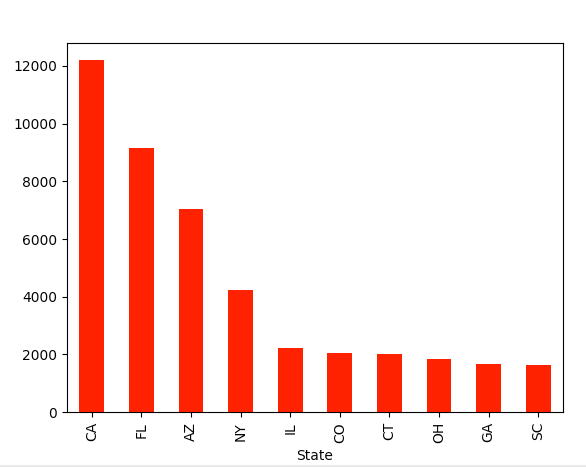
I can’t speak to why it shows that there are 52 states, but I do see that it add a state XX, which I assume is the bucket for NA. I decided to hone in on something familiar. The SSRI Sertraline is a very common anti-anxiety medicine that also has applications across a large spectrum of mental health disorders. So I wanted to ask the question of what is the prescription rate by state and is there any interesting in the data. To get started I took the data frame and filtered it down to only rows that have the drug sertraline. First I had to remove the null rows. The data set has the value presented as upper case and lower case, so I lowered the case and did the comparison that way:

drug_df = drug_df.dropna() # remove the nulls
df = drug_df[drug_df['Product Name'].str.lower() == 'sertraline'] #do the filtering

Now that I have reduced the data set to only contain the drug I am interested in I can start to perform some aggregation. Like mentioned above, I wanted to see the amount of Sertraline that is prescribed in the states so I need to group by State and then sum up the prescription quantities. If we simply print the count by state we get something similar to this:

       Number of Prescriptions State
420                      125.0    AL
1060                      82.0    MS
1305                      51.0    WI
1580                    1162.0    SC
2128                      49.0    GA

Now we can do the grouping and the accumulation and graph it. For the charting I am using matplotlib. I tried several different types of charts, but since the data is so simple a bar chart seems to be the most appropriate. Here is what we need to do now to present the chart:

df = df.groupby('State')['Number of Prescriptions'].sum()
df = df.nlargest(10)
df.plot(kind='bar',x='State',y='Number of Prescriptions',color='red')
plt.show()

So what is the take away from this exercise and the results. The simple answer is I don’t know. It looks like California heavily prescribed the drug Sertraline for Medicare patients in 2010. You cannot make any inferences past that since there were few other fields in the data. I would be interested in seeing a comparison with the same data set from last year, so I will keep searching if that data is available. Anyways…

In this post I learned how to do a few things:

  • Tell Panda what is the column type when you get that weird error: sys:1: DtypeWarning: Columns (19) have mixed types.Specify dtype option on import or set low_memory=False
  • You can take a single column and filter the rows using a standard comparison: df = drug_df[drug_df[‘Product Name’].str.lower() == ‘sertraline’]
  • The groupby function is the same as the one in T-SQL, but maybe a little simpler
  • You can use the plotting tool matplotlib to chart the data: df.plot(kind=’bar’,x=’State’,y=’Number of Prescriptions’,color=’red’)

I am sure that a pro would say that this is child’s play and some day I am certain I will be able to say the same, but for now I am learning so suck it.

Last thing, mental health is a serious issue in the world and if we work to lift the stigma associated with it a lot of good people could get the help they need to live a happier more enriching life!

PROM Data Challenges

My current project is building a survey (in simple terms) system that is for the reporting of PROM (Patient-reported outcome measures) for regenerative medicine. This is their third attempt at building a product to seize on the opportunities in this space. The data that is the output of the system has huge promise and sets the stage to leave this niche corner of practice.

Some examples of these surveys are the FAOS and the KOOS. Standard surveys like these are well defined and their scoring is discrete. Other surveys, such as ones created by a clinician, can be much more loose in the way that they ask the questions. A simple example would look like this:

Function: Stairs ( normal up and down, normal up down with rail, up with rail down unable, etc...)

This is a pretty straight forward for a human to read and understand, but when you have 1000s to munge through this data doesn’t mean anything. Just like any data that you want to report on, you have to transform the data to a shape that makes sense to a computer. Starting with the example question above, it seems to make sense to use the one-hot-encoder. I found this article and it appears to do what I want: Categorical encoding using Label-Encoding and One-Hot-Encoder.

Using his examples as a guide I can create a data frame from pandas to get started. The data set that I used is only two columns for simplicity:

UserId, Function_Stairs
1, "Normal up and down"
2, "Normal up and down"
3, "Up with rail down unable"
import pandas as pd
import numpy as np
# creating initial dataframe
filename='PROMSingleQuestion.csv'
names = ['UserId','Function_Stairs']
stairs_mobility_df = pd.read_csv(filename, names=names)

If I print the data frame at this point, this is what my data looks like:

UserId Function_Stairs
0 1 “Normal up and down”
1 2 “Normal up and down”
2 3 “Up with rail down unable”

The next step is to transform the Function_Stairs column so that we can use it for measurements. First we will drop the User_Id column since we want to protect PII (personal identifiable information) and it is not useful for the experiment.

stairs_mobility_df = stairs_mobility_df.drop(columns=['UserId'])

Now if we print the frame at this point we are left with only the mobility column:

0 “Normal up and down”
1 “Normal up and down”
2 “Up with rail down unable”

It is time to start rotating the data to convert the values(rows) to columns. To do this we will use the pandas function get_dummies for the transformation and then join the new columns back to the original data frame:

dum_df = pd.get_dummies(stairs_mobility_df, columns=["Function_Stairs"], prefix=["Mobility_Level"] )

stairs_mobility_df = stairs_mobility_df.join(dum_df)

When it is all said and done, we are left with the rotation that we want:

RowMobility_Level_Normal up and downMobility_Level_Normal up with rail and down unable
010
110
201

This is much better. Next time I will start to transform the entire dataset. I am still learning, be nice. Thanks Dinesh Yadav for the help.

New Talent

I have been working with computers for a couple of years now and my sphere has been pretty constrained to the giants in the industry. So I didn’t really think that there were more “special” engineers out there, basically due to lack of thought on my part. Recently I started using Twitter again and I made some interesting discoveries. There is a huge amount of talented people across a range of languages, work focus, race and ethnicity.

Over the last 20 years, I can count on two hand the amount of women engineers that I have worked with and one finger a person of color. I am not sure why that is, but this limited my view of who else is out there. I know the bro culture is real, but I also had the belief that there must not be that many women or people of color that were interesting in computer science. I was a fool and lazy for never really pondering the possibility.

My daughter is mixed and I thought if I teach her to be an engineer that she could contribute to the culture shift, but to my surprise that shift was already in high gear. As a manager, I never saw people in terms of color or gender, we just didn’t have people anybody in that category applying. That further reinforced my line of thinking.

Like I said earlier, I started on twitter again and so many women of color are popping up in my feed and they are awesome. I have looked at some of their work and they are shit hot. I guess it was time to pull my head out of my ass and look around at what is happening.

Fuzzy tortoise

I think that some of my dreams are so vivid that I will capture them here. I will not offer any interpretation, since I think that is a little weird.

Night before last, I was in a place that I couldn’t quite picture or at least identify as any place in the real world. I noticed someone holding a tortoise (or maybe a sea turtle) in their arms and they were petting it. I watched how the turtle was extending its neck at the beginning of each stroke. I was now intrigued and wanted in on some of the action. I watched the care taker place the turtle back in the water and this seemed like my chance.

After a few minutes of watching it swim around, I asked if I could also hold it. He said ok, and told me how to pick it up. One hand on the side of its shell and the other under its belly. When I picked it up I realized that it was lighter than I expected.

The turtle started to push his head out from with in the shell and I was determined to pet it. I started to stroke its flippers (?) and it perked up. I paused for a second and the turtle put its flipper on my hand in an effort to get me to continue. I started to pet the head of the turtle and things started to change. This time when I stopped, it put a paw on it that was black and brown. When I looked back towards it head if was my dog (Rottweiler) stuck in a tortoise shell. Like I said, no interpretation, just craziness of my mind.

Facebook fads

Catching up with my wife last night brought up an interesting trend. I assume that these have been circulated for sometime, but I never paid much attention. Games like name your first car and post pictures of them. At first glance, that doesn’t seem too bad. Maybe just a fun way of passing the time, but it is also one of the main security questions for banks and other secure properties. Questions like “What is the make of your first car?” or “What was the color of your first car?” are pretty prevalent in consumer facing secured systems.

I know a lot of my friends and family take part in these and it is hard to explain to them what are the risks and how to decipher the motives. I am sure that most of these are innocent, but we have to think about security nowadays with most things that we do online. I can only lead them to the water, it is up to them what these once they are there.

ECS and Rapid Failure

Yesterday, I created a condition where my Tasks were dying and restarting in rapid succession. When the container started, it immediately failed. Because of this rapid failure, I ran out of disk space because the images where building up. So eventually the tasks were no longer able to deploy, what to do?

ECS does cleanup the old images on the host, but that cleanup interval is defaulted at 3 hours. When the application fails after a second, the deployed images stack up and are not cleaned in enough time. There is a number of settings that you can set in the launch configuration if you need to and are detailed here:

https://docs.aws.amazon.com/AmazonECS/latest/developerguide/automated_image_cleanup.html

There is a specific setting that I am going to try tomorrow that I hope will help protect me from this resource exhaustion. ECS_ENGINE_TASK_CLEANUP_WAIT_DURATION seems to be what I am looking for, but I think the question becomes the impact of setting it to a lower value than 3 hours. I guess I will find that out tomorrow.

As an aside, I found myself in the situation because I was using the wrong access keys for the environment. When the application starts, it reads from secret manager before configuration in the IOC container. The only fix was to either wait 3 hours, not an option, or spool up another host and then let the tasks re-deploy. Hopefully I will have good news to report back!

WFH

I can say that I have been working from home for the better part of the last year. I have worked from home before part time in other jobs, whether I was sick or had some other commitments like a delivery, so it was not particularly new. A side effect of this configuration is that I tend to work more hours and those are productive hours not just the rotation of the clock hands. That is especially so with this pandemic that requires us to be sequestered in our homes.

In the absence of outside activity, I find there is little more to do than work. Is this good or bad I don’t know. It just is. Leading up to this situation I was busy 5 nights a week with my children’s soccer practice which I now miss deeply. That was something that gets me out of the house and creates an interaction with other adults which most can agree is healthy. I guess I can genuinely say I miss my friends.

My kids have adapted well to this situation through the use of online video conferencing tools. It started with our soccer club, they are holding practices virtually which keeps them active. Now the schools have moved to online learning which is impressive since they were able to turn on a dime to make sure our kids education is not stalled.

An interesting force experiment is my wife transitioning to working from home. I think it is working out well since she can roll out of bed and gently ease into starting her day. She has to deal with the public and most of them are not very friendly. She now has the opportunity to walk down and vent to me which I think is making her job a little more bearable which is great.

All in all I think this situation has been positive for our family unit, unfortunately at the grave cost to many other Americans and humans across the globe. While I hope this pandemic is conquered swiftly, I hope the the progress that we have made at home sticks. Stay healthy!

Greetings

This will be the 3rd time I have started a blog, so I am hoping my laziness will subside long enough to get some momentum. I have a lot to say and share, but I also have a million excuses for not doing it.

I think I can, I think I can, I think I can. Does saying it 3 times make it so, time will tell…

TIL – AWS Email Templates

I have been using SES templates for a while now, but I just learned something interesting. Each user will have their own templates, unless I missed something.

Templates are incredibly simple to create, you need only specific the subject and the content. A sample template looks like this:

{
	"Template": {
		"TemplateName": "MyTemplateName",
		"SubjectPart": "{{MySubjectText}}",
		"TextPart": "string",
		"HtmlPart": "<p>Here is my templated content</p>"
	}
}

Ok, I lied you do need a template name and the text part. There are a couple of things to note on the htmlPart. It is not an entire HTML document, only the content between the body tags. As you might expect this also will need to be escaped since it is a proper JSON payload. The help shrink it down I use https://www.textfixer.com/html/compress-html-compression.php to remove all of the line breaks and other characters that would stop this from processing.

Deploying these templates are pretty straight forward, you need to run the aws configure cli command to make sure you are using the correct credentials and pointing to the region that you want (SES is not available everywhere). After that you simple:

aws ses create-template --cli-input-json  "$(cat ./mytemplate.json)" 

This will add it to the library so that you can use it. You follow the same process for updating but you swap create for update:

aws ses update-template --cli-input-json  "$(cat ./mytemplate.json)" 

The way I figured out that the templates were user specific was using the get-template command. When I asked for the template back, I was seeing what I expected. When I used it, I was still getting an old version. I use a different set of access keys for my production and development systems. After all of the non-sense debugging, I decided to give the other credential a try. Sure enough it had the old versions. This is why it is important to know how you are configured ( I knew that) when you are using the cli. FYI, here is how you get the template:

aws ses get-template --template-name mytemplate

As you know, I am a .NET engineer so that is at the heart of everything I do. Here is an example of a method that I used to send out the templated email:

 private async Task<bool> SendTemplateEmailAsync(List<string> destinations, object parameters, string from, string templateName)
        {

            SendTemplatedEmailRequest r = new SendTemplatedEmailRequest();
            Destination d = new Destination(destinations);
            r.Destination = d;
            r.TemplateData = JsonConvert.SerializeObject(parameters);
            r.Template = templateName;
            r.Source = from;
            r.ConfigurationSetName = "Initial";
            try
            { 
                var result = await _client.SendTemplatedEmailAsync(r).ConfigureAwait(false);

                if (result.HttpStatusCode == System.Net.HttpStatusCode.OK)
                {
                    return true;
                }

                return false;
            }
            catch (Exception exception)
            {
                _logger.LogError(0, exception, "Failed to send the email);
            }

            return false;
        }

That is the full path for using the template emails in .NET.